- cancel Jenkin release process
- go to AWS cloudformation. go to Stack Action. click Cancel update stack from drop down.
- wait for update_rollback_complete state
Monday, 18 August 2025
If deploy process stuck because of AWS stack update
If AWS stack update is stuck, and deploy process will not be completed.
Friday, 8 August 2025
AWS Lambda
To access AWS Cloudwatch Logs for Lambda function
- Click Monitor tab
- Click view CloudWatch Logs link
Use environment variable in node.js
//here SHARED_MS_BUCKET is env variable name
Bucket: process.env.SHARED_MS_BUCKETSunday, 11 May 2025
Edit host file for Window 11 WSL (Windows Subsystem for Linux)
You need to edit the following file using notepad and run as admin
C:\Windows\System32\drivers\etc\hostsIf you edit subsystem linux's /etc/hosts, it will not affect browser such as Google Chrome
Access two github accounts in one linux machine
Assume you already can access your person github repositories using public key id_rsa.pub
- Create another ssh private / public key pair
# file name: ~/.ssh/id_rsa2 ssh-keygen - upload public key to your company's github
- create a ssh config at .ssh/config
Host github.com HostName github.com User git IdentityFile ~/.ssh/id_rsa AddKeysToAgent yes ServerAliveInterval 60 ServerAliveCountMax 30 # Work GitHub account Host github-work HostName github.com User git IdentityFile ~/.ssh/id_rsa2 AddKeysToAgent yes ServerAliveInterval 60 ServerAliveCountMax 30 - clone work repository
git clone git@github-work:mycompany/jackt.git - clone your person repository as normal because it will use the default ssh config
Tuesday, 15 April 2025
Access Mysql Database hosted on AWS EC2
To access the database, need to set up two things.
Step 1: add rule to the security group attached to the instance
- Edit inbound rule of the security group
- add a rule. Type: MYSQL/Aurora Soure: custom such as 137.229.127.0/24
Step 2: update privilidge of Mysql database
- log into the database as root or admin
#works for mysql 5.7.8 and up. To change a user's ip RENAME USER 'teau'@'51.27.292.63' TO 'teau'@'125.256.111.%'; # for new user, need to grant permission- FLUSH PRIVILEGES;
Trouble shooting
If do not do the step one, most likely will see a connection timeout
If do not do the second step, will see something like
[MySQL][ODBC 8.0(w) Driver]Host '*.*.***.**' is not allowed to connect to this MySQL server
Unable to connect to the MySQL server "***.***.**.**". Check that the server is running and that you have
access privileges to the requested database.
Some useful Mysql commands
select version();

select user, host from mysql.user;

SHOW GRANTS FOR 'leo'@'52.30.111.16';Tuesday, 25 March 2025
Schedule post to an end point using Amazon EventBridge Rules
- set up a SNS topic
- Create a subscription for this SNS topic. Choose protocol https and enter end point such as
https://paysomething.sandbox.mysite.io/v1/tasks/process - Go to Amazon EventBridge to create a rule
- Make the above SNS topic as target of the rule, and type is Schedule
Work with AWS SQS
- create a rule to put content into sqs
- The above end point to read that sqs. That end point does different jobs according to subject of sqs
Friday, 14 March 2025
AWS WAF
Bock ips to elb
- Click IP set tab
- Click Create IP set button
- Given name, description and IP addresses
- Click Create IP set button to save the IP set
- Click Web ACLs tab
- Click Create Web ACL button
- Follow steps to create web ACL. Add the above ip set rule and action is block
- For Default web ACL action for requests that don't match any rules, choose allow
-
- Click Web ACLs tab agin. The newly created ACL should show up in the list
- Click that ACL
- Click Associate AWS resources tab
- Click Add AWS resource button
- Select the ebl and assoicate it to this Web ACL
- Test it using your own ip
- Go back to that Web ACL home page to check traffic log
Tuesday, 4 March 2025
Add Custom Http Header
Using curl
curl_setopt($ch, CURLOPT_HTTPHEADER, [
    'cookiename: blue',
    'X-Apple-Store-Front: 143444,12'
]);
Google Chrome
Use ModHeader extension
Postman
Click Headers tab to add custom header
Thursday, 30 January 2025
PHP Propel
fake option for migration
docker-compose run --rm -w /var/src/Propel api ./../vendor/bin/propel migrate --fakeit doesn't actually run the migrations, but it marks them as having been completed. It will add versions in propel_migration table.
Friday, 24 January 2025
Public key and private key
Mainly there are two use cases.
- encrypte message using public key. Then decrypt message using private key
- digitally sign message using private key. Then verify signature using public key
Here is example for use case 2. Use SSH public key and private key to do authentication for github after you upload your public key onto github server
- You initiate an SSH connection to the server
- The server chooses a random challenge (a nonce or session identifier) and sends it to you
- Your SSH client uses your private key to compute a digital signature over that challenge
- You send the signature back to the server
- The server uses your stored public key to verify the signature
- If verification succeeds, only someone with the private key could have produced it
- You’re granted access; if it fails, you’re rejected
Another example for use case 2 is bitcoin transaction
- Ower uses private key to sign the transaction
- The signature is verfied by others using public key (the btc address comes from public key)
AWS policy to restrict ips to AWS Gateway API
Here is a sample policy. Only ips in the list will allow to call that API
{
    "Version": "2012-10-17",
    "Statement": [
        {
            "Condition": {
                "IpAddress": {
                    "aws:SourceIp": [
                        "223.333.923.28/32",
                        "162.222.229.139/32"
                    ]
                }
            },
            "Action": [
                "execute-api:Invoke"
            ],
            "Resource": [
                "arn:aws:execute-api:us-west-1:112334444444:1wertttt/*/POST/v1/bill",
                "arn:aws:execute-api:us-west-1:112334444444:1wertttt/*/GET/vi/bill/*"
            ],
            "Effect": "Allow"
        }
    ]
}Monday, 13 January 2025
docker container run breakdown
Here is a command to run php 8 in a host machine which only has php 7 installed
docker run --rm --volume `pwd`:/var/src/ -w /var/src php:8.0.26-cli-alpine3.16 php ./bin/swagger_gen.php ./rest/swagger/v1/Breakdown
--rm Automatically remove the container and its associated anonymous volumes when it exits--volume `pwd`:/var/src/ Bind mount a volume (docker run --volume host-path:container-path- pwd present working directory of your host machine
-w Working directory inside the container
Saturday, 11 January 2025
Indirect modification of overloaded property has no effect
<?php
error_reporting(E_ALL);

class PropertyTest
{
    /**  Location for overloaded data.  */
    private $data = array();


    public function __set($name, $value)
    {
        $this->data[$name] = $value;
    }

    public function __get($name)
    {
        if (array_key_exists($name, $this->data)) {
            return $this->data[$name];
        } else {
            throw new Exception($name . " not found");
        }
    }
}

$obj = new PropertyTest();
$obj->goods = ["a", "b"];

//the line below will throw notice
//Indirect modification of overloaded property PropertyTest::$goods has no effect
$obj->goods[] = "c";

//still got ["a", "b"]
var_dump($obj->goods);
To fix the error, replace the last two lines of codes with the below.
$obj->goods= array_merge($obj->goods, ['c']);

//got ["a", "b", "c"]
var_dump($obj->goods);
Here is another example
$obj = new PropertyTest();
$obj->test=["a"=>2];
var_dump($obj->test);
//will throw the notice and will not change value
$obj->test['a'] =3;
//the result is the same as what we get from the last dump
var_dump($obj->test);
To make it work as expected
$obj = new PropertyTest();
$obj->test=["a"=>2];
var_dump($obj->test);

$ans = $obj->test;
$ans['a'] = 3;
$obj->test = $ans;
var_dump($obj->test)Thursday, 28 November 2024
How to release PHP package from github
Create tag and release the tag.
Steps to make a release
Assume release version 2.0.1
- Check out the desired branch and create a tag v2.0.1 in local.
git tag -a v2.0.1 -m "create tag message" - push tag.
git push origin V2.0.1 - go to github and view all tags
- in the row of tag v2.0.1, click three dots
- choose make a release, and give title v2.0.1
- push release
- Go to Packagist to confirm the release
Thursday, 21 November 2024
PHP error report
find current error report level
Use error_reporting() with no parameters. It will return the current error level.
 //get current error level
if(!defined('STDOUT')) define('STDOUT', fopen('php://stdout', 'wb'));
fwrite(STDOUT, "\nerror level:" . var_export(error_reporting(), true) . "\n");
error level:30711 (the number 30711 is the magic number for the E_ALL error code.)
Settin error level for different env
//show all errors except e_notice and e_strict. It will show deprecated error
//this can be used in sandbox or local
error_reporting(E_ALL & ~E_STRICT & ~E_NOTICE);

//the following will not show depecated warning. This fits to production
error_reporting(E_ERROR | E_WARNING | E_PARSE);Friday, 8 November 2024
Ethereum Blockchain Development
IDE
Deploy a smart contract on Linea Sepolia testnet
- When compile, choose EVM to be london
- When deploy, choose envirnment to be "Injected Provider - MetaMask"
- One deployed contract
Wednesday, 30 October 2024
PHP Laravel
Using MySQL
#choose MySql and do not run migration when ask
laravel new example-app

# change .env with mysql user name and password

# run migration
php artisan migrate
Create a new table
To create new table and new model. Here we use task model as example.
# create a migration and a model class. migration script is in
# this folder database/migrations
# model class is in this folder app/Models
php artisan make:model Task -m
The next step is to edit the migration script to add new columns
public function up(): void
    {
        Schema::create('tasks', function (Blueprint $table) {
            $table->id();
            $table->timestamps();
            $table->string("title");
            $table->text("description");
            $table->text("long_description")->nullable();
            $table->boolean("completed")->default(false);
        });
    }
The last step is run migration to create table tasks.
php artisan migrate(optional) seed the table
To make seed work, need to HasFactory trait in model class
use Illuminate\Database\Eloquent\Factories\HasFactory;
class Payment extends Model
{
    use HasFactory;

    //
}
# create a factory
php artisan make:factory TaskFactory --model=Task

# seed database
php artisan db:seed
Start local server
# after run, go to http://localhost:8000
php artisan serve
Show route
php artisan route:listStart command line
php artisan tinkerFriday, 20 September 2024
Network in AWS - VPC
How to make EC2 instance in private subnet to access internet
- Create a NAT gateway in public subnet
- Edit route table associated to the private subnet. add a roue. destination: 0.0.0.0/0 target: that nat gateway
Security group
- security group is locked down to region and vpc combination
- security group only set ALLOWED rules
Saturday, 7 September 2024
Use WSL (The Windows Subsystem for Linux )
When I bought a new window machine, I would wipe window out and install linux. For window 11 machine I just bought, it has WSL. I want to try it.
Install WSL
- Log in, run as admin and install
wsl --install - restart machine
- create user name and password
To use Ubuntu
- click start button, find Ubuntu and click it.
- another way is to open windon cmd terminal, click arrow, and choose Ubuntu
Install development tools
To install tools such as Docker, vscode and npm, please check docs and DO NOT install directly in ubuntu using apt install.
Install git
sudo apt updatesudo apt install git-all
Install node and npm
sudo apt-get install curl

curl -o- https://raw.githubusercontent.com/nvm-sh/nvm/master/install.sh | bash

#restart terminal. Then
nvm install --lts

#see nodes installed
nvm ls
Access Window files from Linux
cd /mnt/c/Users/<your_Windows_username>
#for example (this is the default folder where download file from Google Driver)
cd /mnt/c/Users/oldwe/Downloads/
cp prj-00-initial-starting-setup.zip ~/.
Install MySQL
sudo apt update
sudo apt install mysql-server
Start and access MySQL
# start MySQL server
systemctl status mysql

# open MySQL client as log in as root
sudo mysql

# create a new user
CREATE USER 'leo'@'localhost' IDENTIFIED  BY 'test1234';

# normally should give privileges by db name.
GRANT ALL PRIVILEGES ON *.* TO 'leo'@'localhost';
In Summary, after install MySQL, to work with it, we need
#start server
systemctl status mysql

#login as root
sudo mysql

#login as a user
mysql -u leo  --password=test1234
Debug
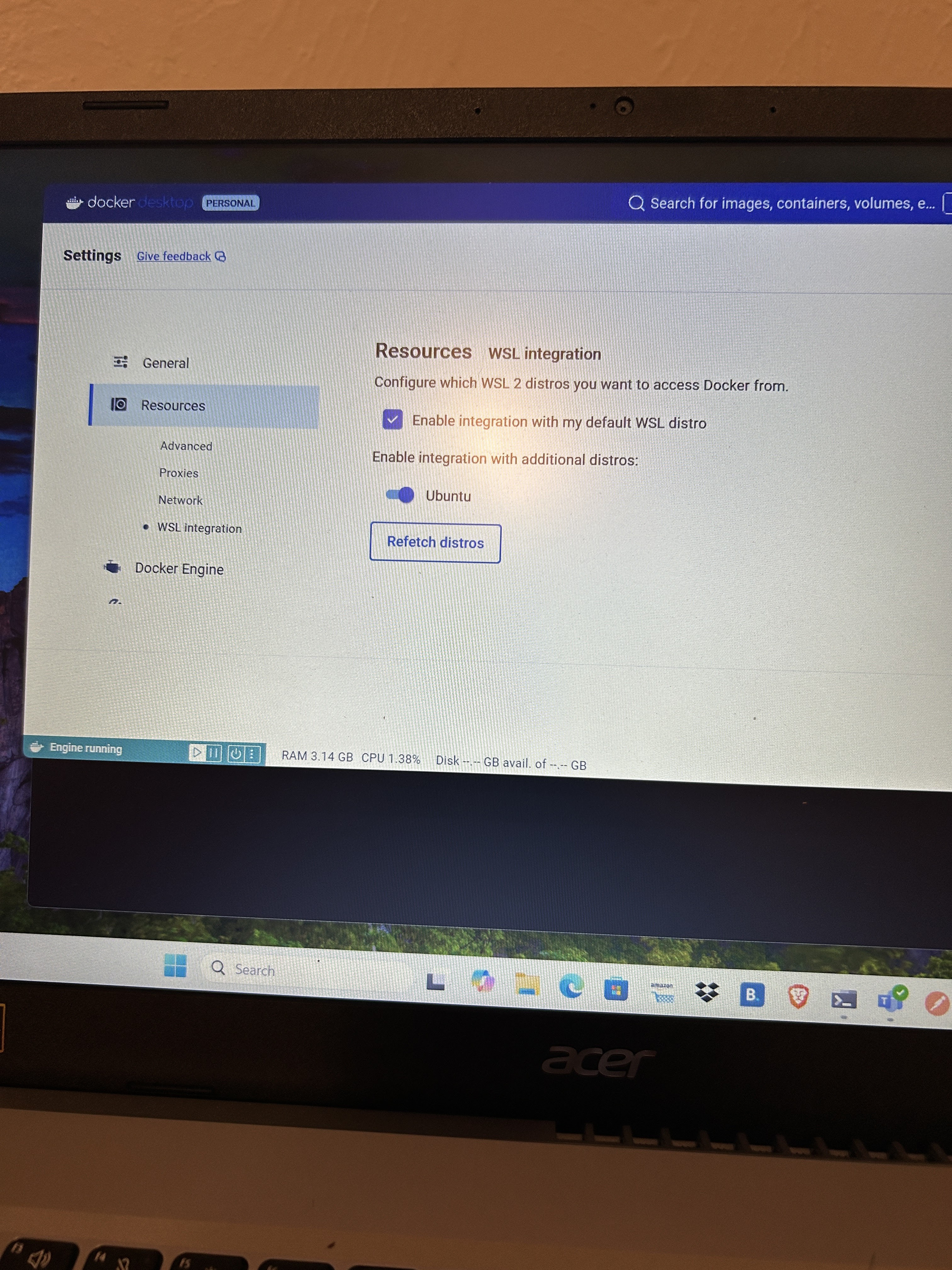
issue 1: Can not access docker daemon in Ubuntu after window update
Solution, need to enable docker desktop with wsl in docker desktop setting.
Tuesday, 27 August 2024
Test PHP codes using Docker container
PHP installed in your local machine is PHP 7. You want to test if your codes work in PHP 8.3. You can use Docker container to do the testing.
#Dockerfile
FROM php:8.3.11RC2-zts-alpine3.20

RUN apk update
RUN apk add php83-dom php83-tokenizer php83-fileinfo php83-simplexml \
        apache2 php83  php83-apache2 php83-ctype php83-openssl \
        php83-curl php83-pecl-apcu php83-opcache php83-bcmath php83-xml \
        php83-intl php83-iconv php83-mbstring php83-session php83-common \
        bash util-linux-misc
RUN apk upgrade

COPY ./ /var/src
<?
//test.php
echo "Hello world", "\n";Step one: put Dockerfile into the same directory where test.php (your php codes) is in.
Step two: Build image, run container and do testing.
#build docker image
docker build --no-cache -t my-test .

#run docker image and go inside container
docker run -it my-test bash

# go to working directory and run the script
cd /var/src
php test.php
Subscribe to:
Posts (Atom)