Friday, 20 September 2024

Network in AWS - VPC

How to make EC2 instance in private subnet to access internet

  • Create a NAT gateway in public subnet
  • Edit route table associated to the private subnet. add a roue. destination: 0.0.0.0/0 target: that nat gateway

Security group

  • security group is locked down to region and vpc combination
  • security group only set ALLOWED rules

Saturday, 7 September 2024

Use WSL (The Windows Subsystem for Linux )

When I bought a new window machine, I would wipe window out and install linux. For window 11 machine I just bought, it has WSL. I want to try it.

Install WSL

  1. Log in, run as admin and install
    wsl --install
  2. restart machine
  3. create user name and password

To use Ubuntu

  • click start button, find Ubuntu and click it.
  • another way is to open windon cmd terminal, click arrow, and choose Ubuntu

Install development tools

To install tools such as Docker, vscode and npm, please check docs and DO NOT install directly in ubuntu using apt install.

Install git

  1. sudo apt update
  2. sudo apt install git-all

Install node and npm

sudo apt-get install curl

curl -o- https://raw.githubusercontent.com/nvm-sh/nvm/master/install.sh | bash

#restart terminal. Then
nvm install --lts

#see nodes installed
nvm ls

Access Window files from Linux

cd /mnt/c/Users/<your_Windows_username>
#for example (this is the default folder where download file from Google Driver)
cd /mnt/c/Users/oldwe/Downloads/
cp prj-00-initial-starting-setup.zip ~/. 

Install MySQL

sudo apt update
sudo apt install mysql-server

Start and access MySQL

# start MySQL server
systemctl status mysql

# open MySQL client as log in as root
sudo mysql

# create a new user
CREATE USER 'leo'@'localhost' IDENTIFIED  BY 'test1234';

# normally should give privileges by db name.
GRANT ALL PRIVILEGES ON *.* TO 'leo'@'localhost';

In Summary, after install MySQL, to work with it, we need

#start server
systemctl status mysql

#login as root
sudo mysql

#login as a user
mysql -u leo  --password=test1234

Debug

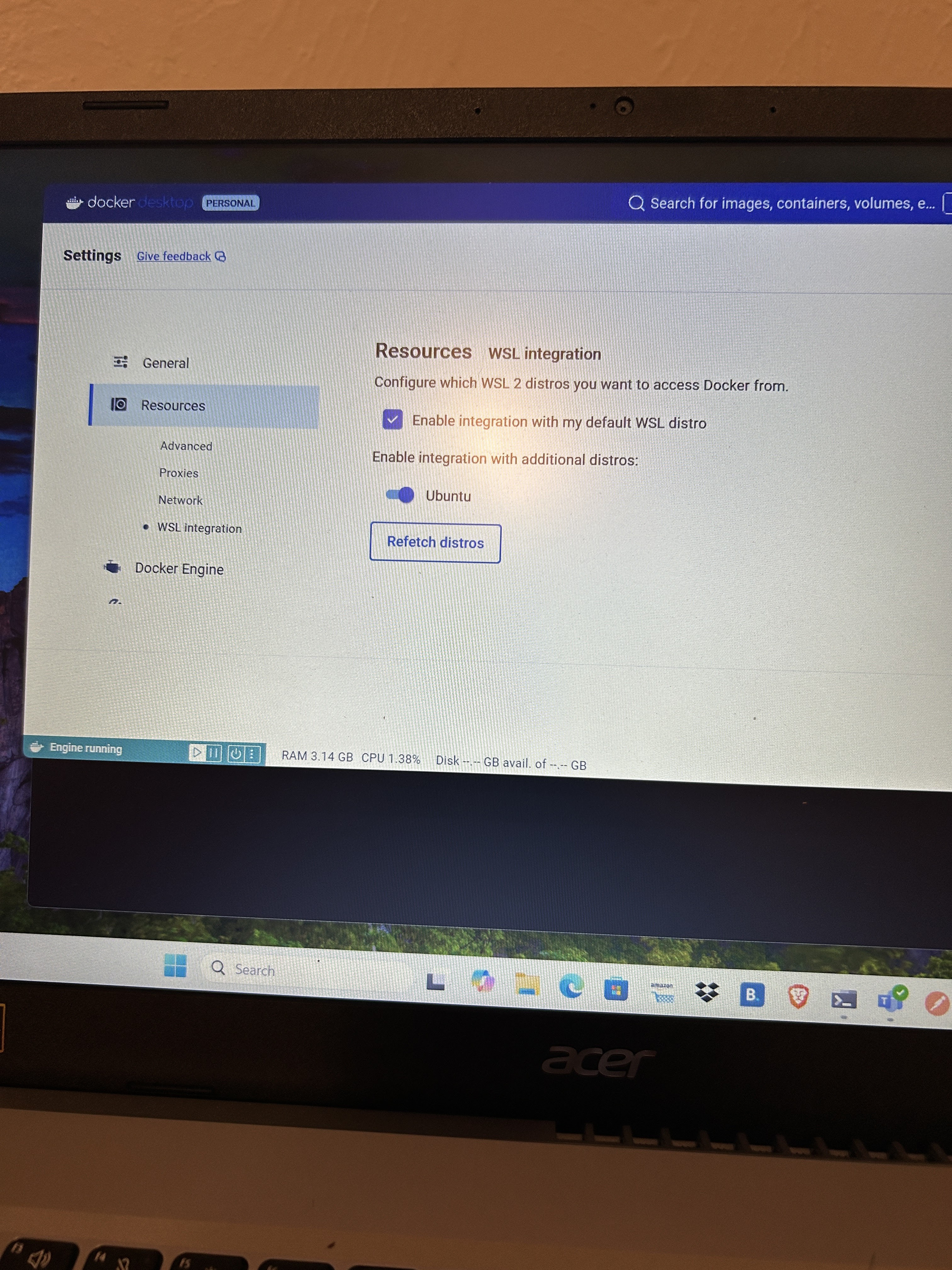
issue 1: Can not access docker daemon in Ubuntu after window update

Solution, need to enable docker desktop with wsl in docker desktop setting.

Tuesday, 27 August 2024

Test PHP codes using Docker container

PHP installed in your local machine is PHP 7. You want to test if your codes work in PHP 8.3. You can use Docker container to do the testing.

#Dockerfile
FROM php:8.3.11RC2-zts-alpine3.20

RUN apk update
RUN apk add php83-dom php83-tokenizer php83-fileinfo php83-simplexml \
        apache2 php83  php83-apache2 php83-ctype php83-openssl \
        php83-curl php83-pecl-apcu php83-opcache php83-bcmath php83-xml \
        php83-intl php83-iconv php83-mbstring php83-session php83-common \
        bash util-linux-misc
RUN apk upgrade

COPY ./ /var/src
<?
//test.php
echo "Hello world", "\n";

Step one: put Dockerfile into the same directory where test.php (your php codes) is in.

Step two: Build image, run container and do testing.

#build docker image
docker build --no-cache -t my-test .

#run docker image and go inside container
docker run -it my-test bash

# go to working directory and run the script
cd /var/src
php test.php

Wednesday, 14 August 2024

PayPal Sandbox

Developer Account, Business Account and Rest APP

  • Business account is linked to develoer account
  • When create a Rest APP, need to choose a business account
  • PayPal merchant id is from the business account
  • client id and secrete is from Rest App

If PayPal merchant id is not matched to client id/secrete, may get the following error when do refund.

'issue' => 'PERMISSION_DENIED',
      'field' => 'capture_id',
      'value' => '7VJ16605X3012345',
      'description' => 'You do not have permission to access or perform operations on this resource.'

Wednesday, 31 July 2024

Can not start mysql docker container in my mac machine

Docker compose file


version: '3'
services:
  mysql:
    container_name: docker_mysql_1
    ports:
      - 3306:3306/tcp
    privileged: true
    restart: on-failure
    environment:
      MYSQL_ROOT_PASSWORD: revenuewire
    command:
      - --innodb_file_per_table=0
      - --innodb_checksum_algorithm=INNODB
      - --binlog_checksum=NONE
      - --sql_mode=NO_ENGINE_SUBSTITUTION
      - --slow-query-log=1
      - --slow-query-log-file=/var/log/mysql/my-slow.log
      - --long_query_time=1
      - --log-queries-not-using-indexes
    image: mysql:8.0
    volumes:
      - mysql:/var/lib/mysql
    network_mode: bridge
volumes:
  mysql:

command to run

docker-compose up -d

Error


2024-07-31T12:03:25.087089Z 0 [System] [MY-013169] [Server] /usr/sbin/mysqld (mysqld 8.0.39) initializing of server in progress as process 80
2024-07-31T12:03:25.089461Z 0 [ERROR] [MY-010457] [Server] --initialize specified but the data directory has files in it. Aborting.
2024-07-31T12:03:25.089468Z 0 [ERROR] [MY-013236] [Server] The designated data directory /var/lib/mysql/ is unusable. You can remove all files that the server added to it.
2024-07-31T12:03:25.089537Z 0 [ERROR] [MY-010119] [Server] Aborting
2024-07-31T12:03:25.089947Z 0 [System] [MY-010910] [Server] /usr/sbin/mysqld: Shutdown complete (mysqld 8.0.39)  MySQL Community Server - GPL.

Try to access mysql volume using Docker Desktop Dashboard

Solved

Look like it is mac VM problem. After do the following, it works. Just do not know why

  1. use docker desktop dashboard to delete all mysql images.
  2. delete volume docker_mysql
  3. stop and delete all containers
  4. shut down mac
  5. start mac
  6. docker-compose up -d

Thursday, 18 July 2024

PHPUnit 11

Install

composer require --dev phpunit/phpunit ^11

Migrate phpunit.xml from PHPUnit 9 to 11

./vendor/bin/phpunit --migrate-configuration

Solve some issues

After upgrade to PHPUnit 11 for 9, got some issues. Here are how I solved them

Metadata in doc-comments is deprecated and will no longer be supported in PHPUnit 12. Update your test code to use attributes instead.

//old codes
/**
 * Test Migrate profile from vault id
 * @depends testCreateProfile
 */
 public function testMigrateProfileFromVaultId($result)
 
 //new code to fix the problem
 /**
  * Test Migrate profile from vault id
  */
  #[Depends('testCreateProfile')]
  public function testMigrateProfileFromVaultId($result)

ArgumentCountError: Too few arguments to function AuthorizenetTest::testProcessRefund(), 0 passed in /var/www/vendor/phpunit/phpunit/src/Framework/TestCase.php

After use attribute #[Depends('testCreateProfile')], got this error.

//to fix it. add this line in the begin of test class
use PHPUnit\Framework\Attributes\Depends;

Show deprecated details

Need this atribute in phpunit config

displayDetailsOnTestsThatTriggerDeprecations="true"
<?xml version="1.0" encoding="UTF-8"?>
<phpunit xmlns:xsi="http://www.w3.org/2001/XMLSchema-instance" 
displayDetailsOnTestsThatTriggerDeprecations="true"
displayDetailsOnPhpunitDeprecations="true"
bootstrap="./src/bootstrap.php" colors="true" stopOnFailure="true" 
xsi:noNamespaceSchemaLocation="https://schema.phpunit.de/11.2/phpunit.xsd" 
cacheDirectory=".phpunit.cache">

......

</phpunit>
 --display-phpunit-deprecations 

Code Coverage

<?xml version="1.0" encoding="UTF-8"?>
<phpunit xmlns:xsi="http://www.w3.org/2001/XMLSchema-instance" displayDetailsOnTestsThatTriggerDeprecations="true"
         displayDetailsOnTestsThatTriggerWarnings="true"
         bootstrap="./bootstrap.php" colors="true" stopOnFailure="true"
         xsi:noNamespaceSchemaLocation="https://schema.phpunit.de/11.2/phpunit.xsd" cacheDirectory=".phpunit.cache">
    <coverage>
        <report>
            <clover outputFile="ut_build/logs/clover.xml"/>
            <html outputDirectory="ut_build/logs/clover.html"/>
            <text outputFile="php://stdout" showUncoveredFiles="true" showOnlySummary="true"/>
        </report>
    </coverage>
    <source>
        <include>
            <directory suffix=".php">./src</directory>
        </include>
        <exclude>
            <file>./src/bootstrap.php</file>
            <directory suffix=".php">./src/Scripts</directory>
        </exclude>
    </source>
    <testsuites>
        <testsuite name="rest">
            <directory>./tests</directory>
        </testsuite>
    </testsuites>
    <logging/>
</phpunit>

coverage and source elements are for code coverage

//in xdebug.ini
xdebug.mode=coverage

Friday, 5 July 2024

OpenAi

News

OpenAi News

Pricing

OpenAi Pricing

Tokenizer

Tokenizer

API Reference

API Docs

OpenAi Modes

OpwnAi Modes

Log Into

Log into OpenAi

See Billing

See Billing

See what modes available

curl https://api.openai.com/v1/models -H "Authorization: Bearer $OPENAI_API_KEY"

Log In

Thursday, 16 May 2024

Symfony Yaml Component

Here to demo how to use Symfony Yaml Component to read Yaml file.

Install

composer require symfony/yaml

Parse Yaml file

#config.yaml
database:
    hostname: 'localhost'
    port:     3306
    name:     'db_name'
    username: 'db_username'
    password: 'db_secret_password'

serviceTopic:
    region: us-west-2
    topic: arn:aws:sns:us-west-2:12345678:production-good-service-topic
//test.php 
<?php

require "./vendor/autoload.php";

use Symfony\Component\Yaml\Yaml;

//$value will be an associate array
$value = Yaml::parseFile('./config.yaml');
var_dump($value);

//another way to parse file. $data and $value are identical
$data = \Symfony\Component\Yaml\Yaml::parse(file_get_contents( "./config.yaml"));
var_dump($data);
//after run: php test.php. Here is the result
array(2) {
  ["database"]=>
  array(5) {
    ["hostname"]=>
    string(9) "localhost"
    ["port"]=>
    int(3306)
    ["name"]=>
    string(7) "db_name"
    ["username"]=>
    string(11) "db_username"
    ["password"]=>
    string(18) "db_secret_password"
  }
  ["serviceTopic"]=>
  array(2) {
    ["region"]=>
    string(9) "us-west-2"
    ["topic"]=>
    string(60) "arn:aws:sns:us-west-2:12345678:production-good-service-topic"
  }
}

Wednesday, 15 May 2024

slim-skeleton works in docker

composer install skim-skeleton

composer create-project slim/slim-skeleton leo
cd leo

# base image's document root is at html/
mv public html

Create a docker file in dirctory leo/ and buid image

FROM revenuewire/docker-php-alpine:1.0.3

COPY ./ /var/src
docker image build -t leo_try .

Spin up a container

# with volume, codes changes will be reflected in container
docker run -v ${PWD}:/var/src -p 8080:80 -d leo_try

go to http://localhost:8080

PHP-DI

To install

composer require php-di/php-di

Usage

<?php
require './vendor/autoload.php';

class Speaker
{
    public function say($content)
    {
        echo "want to say:", $content, "\n";
    }
}

class Meeting
{
    private $speaker;

    public function __construct(Speaker $speaker)
    {
        $this->speaker = $speaker;
    }

    public function broadCast($content)
    {
        $this->speaker->say($content);
    }
}

//automatically inject speaker into meeting
$container = new DI\Container();
$meeting = $container->get('Meeting');
$meeting->broadCast("Hell World");

/**
 * the above codes are the same as the following
 * $speaker = new Speaker();
 * $meeting = new Meeting($speaker);
 * $meeting->broadCast("Hello World 2");
 */

Tuesday, 14 May 2024

PHP Slim

Find Alpine Linux Version

cat /etc/os-release

NAME="Alpine Linux"
ID=alpine
VERSION_ID=3.19.1
PRETTY_NAME="Alpine Linux v3.19"
HOME_URL="https://alpinelinux.org/"
BUG_REPORT_URL="https://gitlab.alpinelinux.org/alpine/aports/-/issues"

Check Apache version in Alpine Linux

httpd -v

Server version: Apache/2.4.56 (Unix)
Server built:   Apr 12 2023 20:59:26

Document root in Alpine Linux

open /etc/apache2/httpd.conf to search for DocumentRoot
httpd.conf:DocumentRoot "/var/src/html" 

Explanation of Docker File

All these lines are related to set up apache. CMD is the command the container executes by default when you launch the built image. There, will run run-http.sh to start server. It is under /usr/local/bin/run-http.sh. Can overwrite the content of run-http.sh

COPY local-run-http.sh /usr/local/bin/run-http.sh
COPY conf/httpd.conf /etc/apache2/httpd.conf
COPY index.php /var/src/html
ADD run-http.sh /usr/local/bin/
RUN chmod +x /usr/local/bin/run-http.sh

EXPOSE 80
CMD ["run-http.sh"]

run-http.sh

#!/bin/sh
# stops the execution of a script if has an erro
set -e

# Apache gets grumpy about PID files pre-existing
rm -f /usr/local/apache2/logs/httpd.pid

#-D FOREGROUND run the web server in the background. Otherwise, the server will start and then it will stop.
exec httpd -DFOREGROUND

Set up Slim 4


./composer.phar require slim/slim:"4.*"
./composer.phar require slim/psr7

How to handle API version in Slim 3

group them into version

//Route.php
 $app->group('/v1', function () use ($app) {
            Controllers\Myapi::initRoute($app);
            });

Request in PHP Slim 4

namespace Psr\Http\Message;
interface ServerRequestInterface extends RequestInterface

namespace Slim\Http;
class ServerRequest implements ServerRequestInterface

namespace Slim\Psr7;
class Request extends Message implements ServerRequestInterface

//from slim\Psr7\Request to Slim\Http\ServerRequest
//Slim\Http\ServerRequest has all methods slim\Psr7\Request has. But Slim\Http\ServerRequest has other method
//Slim\Http\ServerRequest is used by PHP Slim 4
$request = new \Slim\Psr7\Request($method, $uri, $h, $cookies, $serverParams, $stream);
return new \Slim\Http\ServerRequest($request);

//assess body content of a request
$params = $request->getParsedBody();

PHP Slim4 Middleware

<?php
/**
 * Sample PHP Slim 4 middleware
 */

use Psr\Http\Message\ResponseInterface;
use Psr\Http\Message\ServerRequestInterface;
use Psr\Http\Server\RequestHandlerInterface;
use Psr\Http\Server\MiddlewareInterface;

class LoggingMiddleware implements MiddlewareInterface
{
    public function process(ServerRequestInterface $request, RequestHandlerInterface $handler): ResponseInterface
    {
        // Log information about the request
        $method = $request->getMethod();
        $uri = $request->getUri()->__toString();

        fwrite(STDOUT, "\n" . "record by new way middleware. Request: $method $uri\n");

        // Call the next middleware / request handler
        return $handler->handle($request);
    }
}

Access Container Defintion in Controller

It is magic of dependency injection. We give object class name and object is injected!

<?php
use Psr\Container\ContainerInterface;

class Action
{
    public function __construct(ContainerInterface $container)
    {
        $this->di = $container;
        $this->configs = $this->di->get('appConfigs');
        fwrite(STDOUT, "\nconfig:" . var_export($this->configs, true) . "\n\n");
    }
}

Middleware run sequency

Last add and first run

Add Middleware to app

$testM = new \Middlewares\TestM2(self::$app->getContainer());
self::$app->add($testM);

Add container definition in Middleware

//inside middleware
$this->di->set("myprop", "myvalue");

//later in controller $container->get("myprop") to access values

use apcu cache

if(!defined('STDOUT')) define('STDOUT', fopen('php://stdout', 'wb'));
        $cacheKey = "app-configs_hH5XabacqzRk";
        if (apcu_exists($cacheKey)) {
            fwrite(STDOUT, "\ngreat! cache hit\n");
            $val = apcu_fetch($cacheKey);
            fwrite(STDOUT, "\nval:" . $val . "\n");
        } else {
            fwrite(STDOUT, "\n key does not exist. will set");
            apcu_store($cacheKey, "leo");
        }

Get header

//return an array of strings for a given header name
$headerValues = $request->getHeader('Accept');

//return a string seperated by comma
$headerValueString = $request->getHeaderLine('Accept');
Thursday, 4 April 2024

Custom domain of AWS API Gateway

Steps to create custom domain for api created by AWS API Gateway

  • Create a API in API gateway
  • Click custom domain names tab. Then use create button to create a custom domain. Need to provide domain name and select a SSL certificate
  • Configure API mappings for that domain name. Here map to the API created in the first step.
  • Create Record in Route 53. Can be cname or alias and point to API Gateway domain name The format is something like wgatsbbsbfgsdgfz.execute-api.us-west-1.amazonaws.com
    1. Click on your custom domain to view its details
    2. Locate the API Gateway Domain Name field

The record name in Route 53 needs to be the same as custom domain name of API Gateway.

Sunday, 4 February 2024

Shell Script

Write to File

#test.txt file will have content: Hello Word How are you (two lines)
cat << EOF >test.txt
Hello World
How are you
EOF

parameters

//test.sh
!/bin/bash
echo Paramters you pass are $1 and $2

//to call: sh test.sh good bad
//output: Paramters you pass are good and bad

Format Shell Script

shfmt -l -w test.sh

Friday, 5 January 2024

PHP Cheating Sheet

USort and Heap

class Solution {

    /**
     * Leetcode 253
     * @param Integer[][] $intervals
     * @return Integer
     */
    function minMeetingRooms($intervals) {
        usort($intervals, function($a, $b) {
            return $a[0] > $b[0];
        });

        $heap = new SplMinHeap();
        $ans = 1;
        $heap->insert($intervals[0][1]);

        for ($i=1; $i<count($intervals); $i++) {
            $top = $heap->top();
            if ($top <= $intervals[$i][0]) {
                $heap->extract();

            } else {
                $ans++;
            }
            $heap->insert($intervals[$i][1]);
        }

        return $ans;
    }
}

__invoke() magic method

The __invoke() method is called when a script tries to call an object as a function.

<?php
class CallableClass
{
    public function __invoke($x)
    {
        var_dump($x);
    }
}
$obj = new CallableClass;

//will do var_dump (int 5)
$obj(5);

//bool true
var_dump(is_callable($obj));

::class

SomeClass::class will return the fully qualified name of SomeClass including the namespace.


use WW\PayAPI\Middlewares\AuthUsers;

//same as $magic = "WW\PayAPI\Middlewares\AuthUsers";
$magic = AuthUsers::class;

List extensions installed

php -m 

GuzzleHttp\Client API Call

<?php
//get.php
//need to install library  ./composer.phar require guzzlehttp/guzzle 7.5.0
//usage: php get.php
require 'vendor/autoload.php';

use GuzzleHttp\Client;

$client = new Client();
$url = 'https://bin-lookup.test-api.io/v1/search/519396****8565';

// Make a GET request
$response = $client->request('GET', $url, [
    'headers' => [
        'Accept' => 'application/json',
        'x-api-key' => 'ksjddnd24Sj65vUhyqqqqwww'
    ],
    // You can pass query parameters as well
    'query' => [
        'param1' => 'value1',
        'param2' => 'value2'
    ]
]);

// Get the response status code
$statusCode = $response->getStatusCode();
echo "Status Code: $statusCode\n";

$body = $response->getBody();

// Convert JSON response to associative array
$data = json_decode($body, true);

// Print the response data
print_r($data);
<?php
//post.php
/**
 * usage: php post.php
 */
require 'vendor/autoload.php';

$client = new \GuzzleHttp\Client();

$url = "http://local-support.myapitest.com/rest/v1/orders/purchase-lookup";

$response = $client->post($url, [
    'headers' => [
        'Content-Type' => 'application/json',
        'x-api-key' => 'whasjsjsjsjjsjjsjsuuuu|4'
    ],
    //post body sent will be json encoded string
    'json' => [
        'email' => 'mytest@testp.com'
    ]
]);

$body = $response->getBody();
$ans = json_decode($body, true);

var_dump($ans);

$statusCode = $response->getStatusCode();
echo "Status Code: $statusCode\n";

Monday, 11 December 2023

ngrok tunnel

./ngrok http -host-header=rewrite local.reeyysy.cc:80

Use config file to run multi tunnels

  • find config file location.
    ./ngrok authtoken 23siywfFYojsSVe8ojvO0yTEgf4_7dsx9xsdsfffdwww
  • set up config file
  • start tunnels
    ./ngrok start --all

Sample config file

bind_tls means https only to save endpoints


authtoken: 23siywfFYojsSVe8ojvO0yTEgf4_7dcnsnsdfskflfl
tunnels:
  webpack:
    proto: http
    addr: 8090
    host_header: rewrite
    domain: webpack.myseieie.ninja
    bind_tls: true
  cartSite:
    proto: http
    addr: 80
    domain: localhost
    host_header: rewrite
    bind_tls: true

Wednesday, 6 December 2023

React Context

React Context Docs

How to work

  • Create a context
  • Create a context provider component. Add values in the provider
  • Wrap components with the provider component
  • For these wrapped components, can use useContext to access values

Create Context Sample Code

export const placeContext = createContext();

//create a function component PlaceContextProvider
const PlaceContextProvider = ({ children }) => {
  const [places, dispatch] = useReducer(placeReducer, []);
  return (
    <placeContext.Provider value={{ places, dispatch }}>
      {children}
    </placeContext.Provider>
  );
};

export default PlaceContextProvider;

Main parts to create a context

  1. call createContext()// const placeContext = createContext();
  2. Create a context provider component. Set values property when create this component.
  3. export the above context provider

Use context provider

import PlaceContextProvider from "./contexts/place";

function App() {
  return (
    <div className="App">
      <PlaceContextProvider>
        <Nav />
        <PlaceList />

        <PlaceForm />
      </PlaceContextProvider>
    </div>
  );
}

export default App;

Main parts to use context provider

  1. import context provider
  2. wrap components which will use context in the context provider

Use context in a component

import { placeContext } from "../contexts/place";

export default function Nav() {
  const { places } = useContext(placeContext);
  return <h1>You have visited {places.length} places.</h1>;
}

Main parts to use context in a component

  1. import context (not context provider)
  2. pass the context as paramter of useConext function
  3. destruct the result which is values we pass to context provider
  4. use these values in the component

Tuesday, 28 November 2023

Stripe Webhook

Stripe provides with webhooks for event such as checkout.session.completed.

Set up webhook

  • log into Stripe
  • Click developer tab
  • Click webhook tab
  • following instruction to create a webhook

See Webhook successful or failed event

  • log into Stripe and go to webhook tab (see above)
  • click a webhook in the list of webhooks
  • click one event log in the list of event
  • Should see the details of request and response of the event

Test webhook in local server

  • ./ngrok http -host-header=rewrite local.reeyysy.cc:80
  • set up webhook using url generated by ngrok
  • try to fire an event
  • if failed, log into Stripe and find the failed event. Click resend to send event again.

Friday, 27 October 2023

Google Pay

Introduction

Google Pay for the web is built on the Payment Request API, an open web standard candidate that relies on the customer's browser as a secure intermediary for payments.

What is Payment Request API

It is one part of Web Payments standard.

Web Payments is an emerging web standard being developed by the W3C to simplify online payments. Web Payments consist of the following web standards:

  • Payment Request API
  • Payment Handler API
  • Payment Method Identifiers
  • Payment Method Manifest
//sample code for Payment Request
const request = new PaymentRequest(paymentMethods, paymentDetails);
request.canMakePayment().then(result => {
  if (result) {
    // This browser supports the specified payment method.
  } else {
    // This browser does NOT support the specified payment method.
  }
}).catch(e => {
  // An exception
});

Standalone page to show Google Pay

Google Pay Tutorial

<html>
<head>
    <script async src="https://pay.google.com/gp/p/js/pay.js" onload="onGooglePayLoaded()"></script>
    <script>
        const tokenizationSpec = {
            type: 'PAYMENT_GATEWAY',
            parameters: {
                gateway: 'example',
                gatewayMerchantId: 'gatewayMerchantId'
            }
        };

        const cardPaymentMethod = {
            type: 'CARD',
            tokenizationSpecification: tokenizationSpec,
            parameters: {
                allowedCardNetworks: ['VISA', 'AMEX'],
                allowedAuthMethods:
                    ['PAN_ONLY', 'CRYPTOGRAM_3DS'],
                billingAddressRequired: true,
                billingAddressParameters: {
                    format: 'FULL',
                    phoneNumberRequired: true
                }
            }
        }

        function onGooglePayLoaded() {
            const googlePayClient = new google.payments.api.PaymentsClient({ environment: "TEST" });

            const clientConfiguration = {
                apiVersion: 2,
                apiVersionMinor: 0,
                allowedPaymentMethods: [cardPaymentMethod]
            };

            googlePayClient.isReadyToPay(clientConfiguration)
                .then(function (response) {
                    console.log(response)
                    if (response.result) {
                        //create button
                        let button = googlePayClient.createButton({
                            buttonColor: 'default',
                            buttonType: 'long',
                            onClick: handleSubmit
                        })

                        document.getElementById('gp').appendChild(button);
                    }
                }).catch(function (err) {
                });

            function handleSubmit() {
                const paymentDataRequest = Object.assign({}, clientConfiguration);
                paymentDataRequest.transactionInfo = {
                    totalPriceStatus: 'FINAL',
                    totalPrice: '123.45',
                    currencyCode: 'USD'
                }

                paymentDataRequest.merchantInfo = {
                    merchantId: '0123456789',
                    merchantName: 'Example Merchant'
                }

                googlePayClient.loadPaymentData(paymentDataRequest)
                    .then(function (paymentData) {
                        console.log("payment data:", paymentData)
                    })
            }
        }

        
    </script>
</head>

<body>
    <p>Try Google Pay</p>
    <p id="gp"></p>
</body>

</html>

Local development

  • if it is localhost, Google allows it to be http
  • let a gmail to joined into sandbox test group and do not need to provide card when click "Google Pay button"

Join sandbox test group

Thursday, 26 October 2023

JSON Web Tokens

JSON Web Tokens are an open, industry standard RFC 7519 method for representing claims securely between two parties.

For JWT token, it consists of three parts:

  • header about alg and type
  • payload
  • signature

PHP codes to generate a JWT


    function createJWT($payload, $secret)
    {
        //this is alg used
        $header = ["typ" => "JWT", "alg" => "HS256"];

        $encodedHead = base64url_encode(json_encode($header));
        $encodedPayLoad = base64url_encode(json_encode($payload));

        //build the first two parts
        $encodedHeaderAndPayload = $encodedHead . '.' . $encodedPayLoad;

        $signature = base64url_encode(hash_hmac('sha256', $encodedHeaderAndPayload, $secret, true));

        //build token
        return $encodedHeaderAndPayload. '.' . $signature;
    }

    function base64url_encode($data)
    {
        return rtrim(strtr(base64_encode($data), '+/', '-_'), '=');
    }