fake option for migration
docker-compose run --rm -w /var/src/Propel api ./../vendor/bin/propel migrate --fakeit doesn't actually run the migrations, but it marks them as having been completed. It will add versions in propel_migration table.
docker-compose run --rm -w /var/src/Propel api ./../vendor/bin/propel migrate --fakeit doesn't actually run the migrations, but it marks them as having been completed. It will add versions in propel_migration table.
Mainly there are two use cases.
Here is example for use case 2. Use SSH public key and private key to do authentication for github after you upload your public key onto github server
Another example for use case 2 is bitcoin transaction
Here is a sample policy. Only ips in the list will allow to call that API
{
    "Version": "2012-10-17",
    "Statement": [
        {
            "Condition": {
                "IpAddress": {
                    "aws:SourceIp": [
                        "223.333.923.28/32",
                        "162.222.229.139/32"
                    ]
                }
            },
            "Action": [
                "execute-api:Invoke"
            ],
            "Resource": [
                "arn:aws:execute-api:us-west-1:112334444444:1wertttt/*/POST/v1/bill",
                "arn:aws:execute-api:us-west-1:112334444444:1wertttt/*/GET/vi/bill/*"
            ],
            "Effect": "Allow"
        }
    ]
}Here is a command to run php 8 in a host machine which only has php 7 installed
docker run --rm --volume `pwd`:/var/src/ -w /var/src php:8.0.26-cli-alpine3.16 php ./bin/swagger_gen.php ./rest/swagger/v1/Breakdown
--rm Automatically remove the container and its associated anonymous volumes when it exits--volume `pwd`:/var/src/ Bind mount a volume (docker run --volume host-path:container-path-w Working directory inside the container<?php
error_reporting(E_ALL);
class PropertyTest
{
/** Location for overloaded data. */
private $data = array();
public function __set($name, $value)
{
$this->data[$name] = $value;
}
public function __get($name)
{
if (array_key_exists($name, $this->data)) {
return $this->data[$name];
} else {
throw new Exception($name . " not found");
}
}
}
$obj = new PropertyTest();
$obj->goods = ["a", "b"];
//the line below will throw notice
//Indirect modification of overloaded property PropertyTest::$goods has no effect
$obj->goods[] = "c";
//still got ["a", "b"]
var_dump($obj->goods);To fix the error, replace the last two lines of codes with the below.
$obj->goods= array_merge($obj->goods, ['c']);

//got ["a", "b", "c"]
var_dump($obj->goods);
Here is another example
$obj = new PropertyTest();
$obj->test=["a"=>2];
var_dump($obj->test);
//will throw the notice and will not change value
$obj->test['a'] =3;
//the result is the same as what we get from the last dump
var_dump($obj->test);
To make it work as expected
$obj = new PropertyTest();
$obj->test=["a"=>2];
var_dump($obj->test);

$ans = $obj->test;
$ans['a'] = 3;
$obj->test = $ans;
var_dump($obj->test)Create tag and release the tag.
Assume release version 2.0.1
git tag -a v2.0.1 -m "create tag message"git push origin V2.0.1Use error_reporting() with no parameters. It will return the current error level.
 //get current error level
if(!defined('STDOUT')) define('STDOUT', fopen('php://stdout', 'wb'));
fwrite(STDOUT, "\nerror level:" . var_export(error_reporting(), true) . "\n");
error level:30711 (the number 30711 is the magic number for the E_ALL error code.)
//show all errors except e_notice and e_strict. It will show deprecated error
//this can be used in sandbox or local
error_reporting(E_ALL & ~E_STRICT & ~E_NOTICE);

//the following will not show depecated warning. This fits to production
error_reporting(E_ERROR | E_WARNING | E_PARSE);#choose MySql and do not run migration when ask
laravel new example-app
# change .env with mysql user name and password
# run migration
php artisan migrateTo create new table and new model. Here we use task model as example.
# create a migration and a model class. migration script is in
# this folder database/migrations
# model class is in this folder app/Models
php artisan make:model Task -m
The next step is to edit the migration script to add new columns
public function up(): void
    {
        Schema::create('tasks', function (Blueprint $table) {
            $table->id();
            $table->timestamps();
            $table->string("title");
            $table->text("description");
            $table->text("long_description")->nullable();
            $table->boolean("completed")->default(false);
        });
    }
The last step is run migration to create table tasks.
php artisan migrate(optional) seed the table
To make seed work, need to HasFactory trait in model class
use Illuminate\Database\Eloquent\Factories\HasFactory;
class Payment extends Model
{
    use HasFactory;

    //
}
# create a factory
php artisan make:factory TaskFactory --model=Task

# seed database
php artisan db:seed
# after run, go to http://localhost:8000
php artisan serve php artisan route:listphp artisan tinkerWhen I bought a new window machine, I would wipe window out and install linux. For window 11 machine I just bought, it has WSL. I want to try it.
Install WSL
wsl --installTo use Ubuntu
Install development tools
To install tools such as Docker, vscode and npm, please check docs and DO NOT install directly in ubuntu using apt install.
Install git
sudo apt updatesudo apt install git-allInstall node and npm
sudo apt-get install curl

curl -o- https://raw.githubusercontent.com/nvm-sh/nvm/master/install.sh | bash

#restart terminal. Then
nvm install --lts

#see nodes installed
nvm ls
Access Window files from Linux
cd /mnt/c/Users/<your_Windows_username>
#for example (this is the default folder where download file from Google Driver)
cd /mnt/c/Users/oldwe/Downloads/
cp prj-00-initial-starting-setup.zip ~/.
Install MySQL
sudo apt update
sudo apt install mysql-server
Start and access MySQL
# start MySQL server
systemctl status mysql

# open MySQL client as log in as root
sudo mysql

# create a new user
CREATE USER 'leo'@'localhost' IDENTIFIED  BY 'test1234';

# normally should give privileges by db name.
GRANT ALL PRIVILEGES ON *.* TO 'leo'@'localhost';
In Summary, after install MySQL, to work with it, we need
#start server
systemctl status mysql

#login as root
sudo mysql

#login as a user
mysql -u leo --password=test1234issue 1: Can not access docker daemon in Ubuntu after window update
Solution, need to enable docker desktop with wsl in docker desktop setting.
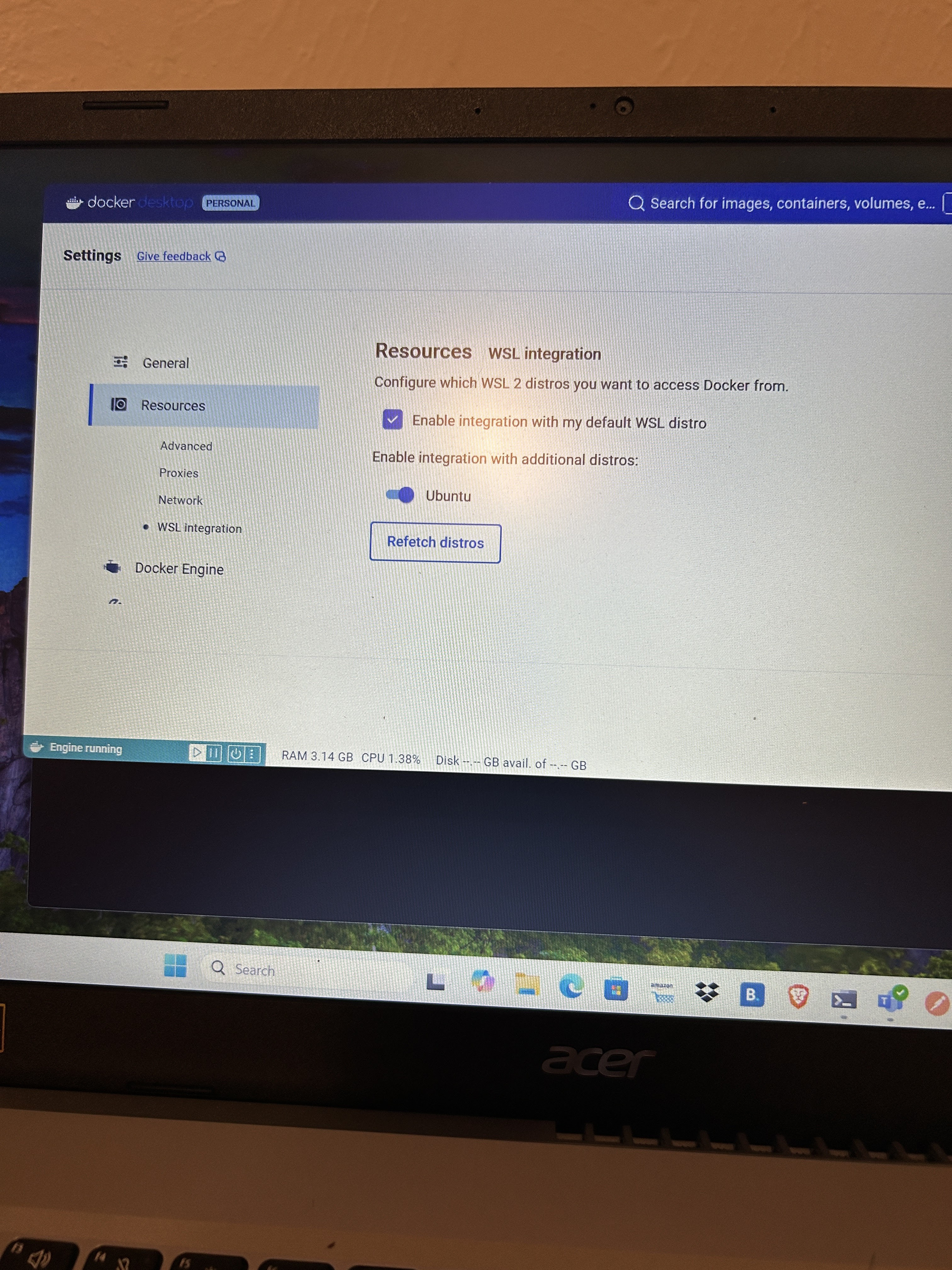
PHP installed in your local machine is PHP 7. You want to test if your codes work in PHP 8.3. You can use Docker container to do the testing.
#Dockerfile
FROM php:8.3.11RC2-zts-alpine3.20

RUN apk update
RUN apk add php83-dom php83-tokenizer php83-fileinfo php83-simplexml \
        apache2 php83  php83-apache2 php83-ctype php83-openssl \
        php83-curl php83-pecl-apcu php83-opcache php83-bcmath php83-xml \
        php83-intl php83-iconv php83-mbstring php83-session php83-common \
        bash util-linux-misc
RUN apk upgrade

COPY ./ /var/src
<?
//test.php
echo "Hello world", "\n";Step one: put Dockerfile into the same directory where test.php (your php codes) is in.
Step two: Build image, run container and do testing.
#build docker image
docker build --no-cache -t my-test .

#run docker image and go inside container
docker run -it my-test bash

# go to working directory and run the script
cd /var/src
php test.phpIf PayPal merchant id is not matched to client id/secrete, may get the following error when do refund.
'issue' => 'PERMISSION_DENIED',
      'field' => 'capture_id',
      'value' => '7VJ16605X3012345',
'description' => 'You do not have permission to access or perform operations on this resource.'Docker compose file
version: '3'
services:
  mysql:
    container_name: docker_mysql_1
    ports:
      - 3306:3306/tcp
    privileged: true
    restart: on-failure
    environment:
      MYSQL_ROOT_PASSWORD: revenuewire
    command:
      - --innodb_file_per_table=0
      - --innodb_checksum_algorithm=INNODB
      - --binlog_checksum=NONE
      - --sql_mode=NO_ENGINE_SUBSTITUTION
      - --slow-query-log=1
      - --slow-query-log-file=/var/log/mysql/my-slow.log
      - --long_query_time=1
      - --log-queries-not-using-indexes
    image: mysql:8.0
    volumes:
      - mysql:/var/lib/mysql
    network_mode: bridge
volumes:
  mysql:
command to run
docker-compose up -dError
2024-07-31T12:03:25.087089Z 0 [System] [MY-013169] [Server] /usr/sbin/mysqld (mysqld 8.0.39) initializing of server in progress as process 80
2024-07-31T12:03:25.089461Z 0 [ERROR] [MY-010457] [Server] --initialize specified but the data directory has files in it. Aborting.
2024-07-31T12:03:25.089468Z 0 [ERROR] [MY-013236] [Server] The designated data directory /var/lib/mysql/ is unusable. You can remove all files that the server added to it.
2024-07-31T12:03:25.089537Z 0 [ERROR] [MY-010119] [Server] Aborting
2024-07-31T12:03:25.089947Z 0 [System] [MY-010910] [Server] /usr/sbin/mysqld: Shutdown complete (mysqld 8.0.39)  MySQL Community Server - GPL.
Try to access mysql volume using Docker Desktop Dashboard

Solved
Look like it is mac VM problem. After do the following, it works. Just do not know why
composer require --dev phpunit/phpunit ^11./vendor/bin/phpunit --migrate-configurationAfter upgrade to PHPUnit 11 for 9, got some issues. Here are how I solved them
Metadata in doc-comments is deprecated and will no longer be supported in PHPUnit 12. Update your test code to use attributes instead.
//old codes
/**
 * Test Migrate profile from vault id
 * @depends testCreateProfile
 */
 public function testMigrateProfileFromVaultId($result)

 //new code to fix the problem
 /**
  * Test Migrate profile from vault id
  */
  #[Depends('testCreateProfile')]
  public function testMigrateProfileFromVaultId($result)
ArgumentCountError: Too few arguments to function AuthorizenetTest::testProcessRefund(), 0 passed in /var/www/vendor/phpunit/phpunit/src/Framework/TestCase.php
After use attribute #[Depends('testCreateProfile')], got this error.
//to fix it. add this line in the begin of test class
use PHPUnit\Framework\Attributes\Depends;Need this atribute in phpunit config
displayDetailsOnTestsThatTriggerDeprecations="true"<?xml version="1.0" encoding="UTF-8"?>
<phpunit xmlns:xsi="http://www.w3.org/2001/XMLSchema-instance"
displayDetailsOnTestsThatTriggerDeprecations="true"
displayDetailsOnPhpunitDeprecations="true"
bootstrap="./src/bootstrap.php" colors="true" stopOnFailure="true"
xsi:noNamespaceSchemaLocation="https://schema.phpunit.de/11.2/phpunit.xsd"
cacheDirectory=".phpunit.cache">
......
</phpunit> --display-phpunit-deprecations <?xml version="1.0" encoding="UTF-8"?>
<phpunit xmlns:xsi="http://www.w3.org/2001/XMLSchema-instance" displayDetailsOnTestsThatTriggerDeprecations="true"
displayDetailsOnTestsThatTriggerWarnings="true"
bootstrap="./bootstrap.php" colors="true" stopOnFailure="true"
xsi:noNamespaceSchemaLocation="https://schema.phpunit.de/11.2/phpunit.xsd" cacheDirectory=".phpunit.cache">
<coverage>
<report>
<clover outputFile="ut_build/logs/clover.xml"/>
<html outputDirectory="ut_build/logs/clover.html"/>
<text outputFile="php://stdout" showUncoveredFiles="true" showOnlySummary="true"/>
</report>
</coverage>
<source>
<include>
<directory suffix=".php">./src</directory>
</include>
<exclude>
<file>./src/bootstrap.php</file>
<directory suffix=".php">./src/Scripts</directory>
</exclude>
</source>
<testsuites>
<testsuite name="rest">
<directory>./tests</directory>
</testsuite>
</testsuites>
<logging/>
</phpunit>coverage and source elements are for code coverage
//in xdebug.ini
xdebug.mode=coverageHere to demo how to use Symfony Yaml Component to read Yaml file.
composer require symfony/yaml#config.yaml
database:
hostname: 'localhost'
port: 3306
name: 'db_name'
username: 'db_username'
password: 'db_secret_password'
serviceTopic:
region: us-west-2
topic: arn:aws:sns:us-west-2:12345678:production-good-service-topic//test.php
<?php
require "./vendor/autoload.php";
use Symfony\Component\Yaml\Yaml;
//$value will be an associate array
$value = Yaml::parseFile('./config.yaml');
var_dump($value);
//another way to parse file. $data and $value are identical
$data = \Symfony\Component\Yaml\Yaml::parse(file_get_contents( "./config.yaml"));
var_dump($data);//after run: php test.php. Here is the result
array(2) {
["database"]=>
array(5) {
["hostname"]=>
string(9) "localhost"
["port"]=>
int(3306)
["name"]=>
string(7) "db_name"
["username"]=>
string(11) "db_username"
["password"]=>
string(18) "db_secret_password"
}
["serviceTopic"]=>
array(2) {
["region"]=>
string(9) "us-west-2"
["topic"]=>
string(60) "arn:aws:sns:us-west-2:12345678:production-good-service-topic"
}
}composer create-project slim/slim-skeleton leo
cd leo
# base image's document root is at html/
mv public html
FROM revenuewire/docker-php-alpine:1.0.3

COPY ./ /var/src
docker image build -t leo_try .# with volume, codes changes will be reflected in container
docker run -v ${PWD}:/var/src -p 8080:80 -d leo_trygo to http://localhost:8080
To install
composer require php-di/php-diUsage
<?php
require './vendor/autoload.php';

class Speaker
{
    public function say($content)
    {
        echo "want to say:", $content, "\n";
    }
}

class Meeting
{
    private $speaker;

    public function __construct(Speaker $speaker)
    {
        $this->speaker = $speaker;
    }

    public function broadCast($content)
    {
        $this->speaker->say($content);
    }
}

//automatically inject speaker into meeting
$container = new DI\Container();
$meeting = $container->get('Meeting');
$meeting->broadCast("Hell World");

/**
 * the above codes are the same as the following
 * $speaker = new Speaker();
 * $meeting = new Meeting($speaker);
 * $meeting->broadCast("Hello World 2");
 */
cat /etc/os-release

NAME="Alpine Linux"
ID=alpine
VERSION_ID=3.19.1
PRETTY_NAME="Alpine Linux v3.19"
HOME_URL="https://alpinelinux.org/"
BUG_REPORT_URL="https://gitlab.alpinelinux.org/alpine/aports/-/issues"httpd -v
Server version: Apache/2.4.56 (Unix)
Server built: Apr 12 2023 20:59:26open /etc/apache2/httpd.conf to search for DocumentRoot
httpd.conf:DocumentRoot "/var/src/html" All these lines are related to set up apache. CMD is the command the container executes by default when you launch the built image. There, will run run-http.sh to start server. It is under /usr/local/bin/run-http.sh. Can overwrite the content of run-http.sh
COPY local-run-http.sh /usr/local/bin/run-http.shCOPY conf/httpd.conf /etc/apache2/httpd.conf
COPY index.php /var/src/html
ADD run-http.sh /usr/local/bin/
RUN chmod +x /usr/local/bin/run-http.sh
EXPOSE 80
CMD ["run-http.sh"]#!/bin/sh
# stops the execution of a script if has an erro
set -e
# Apache gets grumpy about PID files pre-existing
rm -f /usr/local/apache2/logs/httpd.pid
#-D FOREGROUND run the web server in the background. Otherwise, the server will start and then it will stop.
exec httpd -DFOREGROUND
./composer.phar require slim/slim:"4.*"
./composer.phar require slim/psr7group them into version
//Route.php
 $app->group('/v1', function () use ($app) {
            Controllers\Myapi::initRoute($app);
});namespace Psr\Http\Message;
interface ServerRequestInterface extends RequestInterface
namespace Slim\Http;
class ServerRequest implements ServerRequestInterface
namespace Slim\Psr7;
class Request extends Message implements ServerRequestInterface
//from slim\Psr7\Request to Slim\Http\ServerRequest
//Slim\Http\ServerRequest has all methods slim\Psr7\Request has. But Slim\Http\ServerRequest has other method
//Slim\Http\ServerRequest is used by PHP Slim 4
$request = new \Slim\Psr7\Request($method, $uri, $h, $cookies, $serverParams, $stream);
return new \Slim\Http\ServerRequest($request);
//assess body content of a request
$params = $request->getParsedBody();
<?php
/**
 * Sample PHP Slim 4 middleware
 */

use Psr\Http\Message\ResponseInterface;
use Psr\Http\Message\ServerRequestInterface;
use Psr\Http\Server\RequestHandlerInterface;
use Psr\Http\Server\MiddlewareInterface;

class LoggingMiddleware implements MiddlewareInterface
{
    public function process(ServerRequestInterface $request, RequestHandlerInterface $handler): ResponseInterface
    {
        // Log information about the request
        $method = $request->getMethod();
        $uri = $request->getUri()->__toString();

        fwrite(STDOUT, "\n" . "record by new way middleware. Request: $method $uri\n");

        // Call the next middleware / request handler
        return $handler->handle($request);
    }
}
It is magic of dependency injection. We give object class name and object is injected!
<?php
use Psr\Container\ContainerInterface;

class Action
{
    public function __construct(ContainerInterface $container)
    {
        $this->di = $container;
        $this->configs = $this->di->get('appConfigs');
        fwrite(STDOUT, "\nconfig:" . var_export($this->configs, true) . "\n\n");
    }
}Last add and first run
$testM = new \Middlewares\TestM2(self::$app->getContainer());
self::$app->add($testM);//inside middleware
$this->di->set("myprop", "myvalue");
//later in controller $container->get("myprop") to access valuesif(!defined('STDOUT')) define('STDOUT', fopen('php://stdout', 'wb'));
$cacheKey = "app-configs_hH5XabacqzRk";
if (apcu_exists($cacheKey)) {
fwrite(STDOUT, "\ngreat! cache hit\n");
$val = apcu_fetch($cacheKey);
fwrite(STDOUT, "\nval:" . $val . "\n");
} else {
fwrite(STDOUT, "\n key does not exist. will set");
apcu_store($cacheKey, "leo");
}//return an array of strings for a given header name
$headerValues = $request->getHeader('Accept');
//return a string seperated by comma
$headerValueString = $request->getHeaderLine('Accept');